For teams that ship with coding agents
Keep sight of what your AI builds.
Agents write code faster than anyone can read it. Vibe Tools shows you what actually changed in your product, so reviews take minutes, not meetings.
Agents write code faster than anyone can read it. Vibe Tools shows you what actually changed in your product, so reviews take minutes, not meetings.
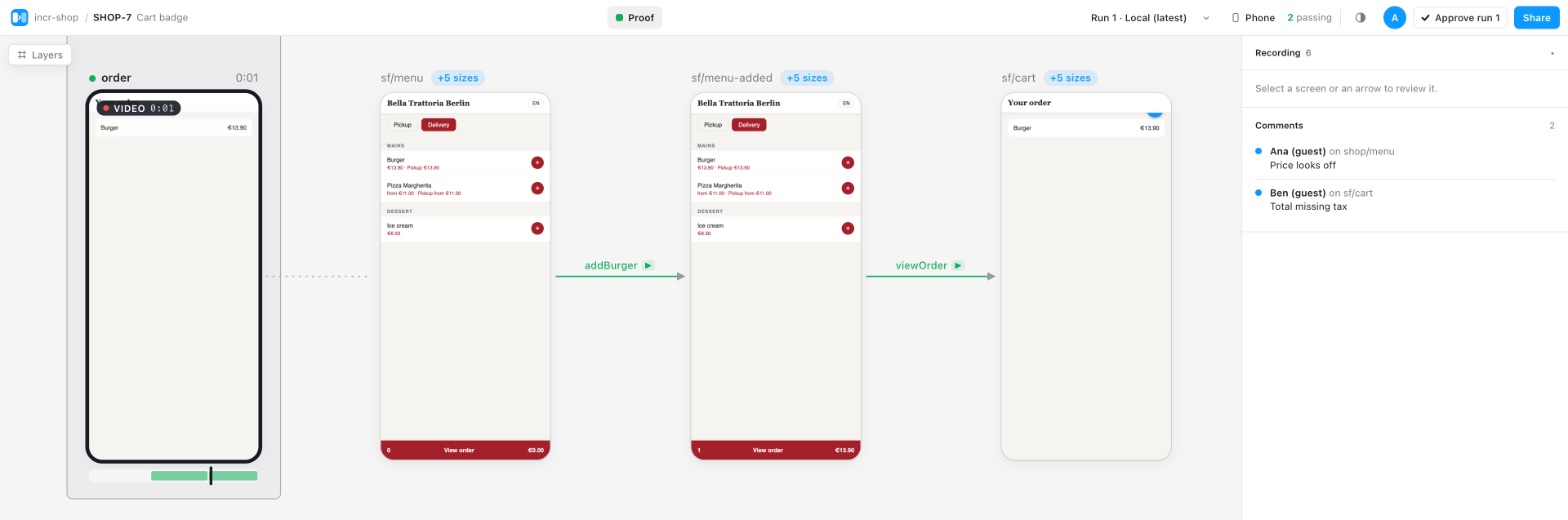
Every e2e run becomes a board: each screen, each tap between them, recorded on the real app. One board per ticket or PR, and one living map of your main branch.
Main stays up to date on every merge. Only the tests your change touched rerun.
QA, PMs and designers mark each screen. Approval turns the GitHub check green.
Phone, desktop and edge cases side by side. Spot the German label that breaks at 320 px.
Agents push runs from CI and read boards over MCP. One prompt sets it all up.
Playwright for web, XCUITest for iOS, or any runner that writes a small JSON file.
await flow.screen("menu/list");
await flow.tap(addButton, { to: "menu/cart" });
Screens become WebP, files the server has are skipped.
npx sightboard push proofs.json \
--project shop-web # PR board by defaultOpen the link on the PR, mark what's right and wrong, approve.
Your tests run where they already run. Secrets are redacted on your side, request headers are never stored, and you can self-host the whole thing.
Name a screen once. The runner shoots it, records taps, video and the network calls behind each step.
Every push lands on the board for its ticket or PR, with before and after when you need it.
Verdicts and comments live on the screen they're about, not in a chat thread.
SightBoard is the first. Each Vibe Tool solves one problem of building with AI.